Rouser by ajfbyte
One hotkey for every AI dev workflow.
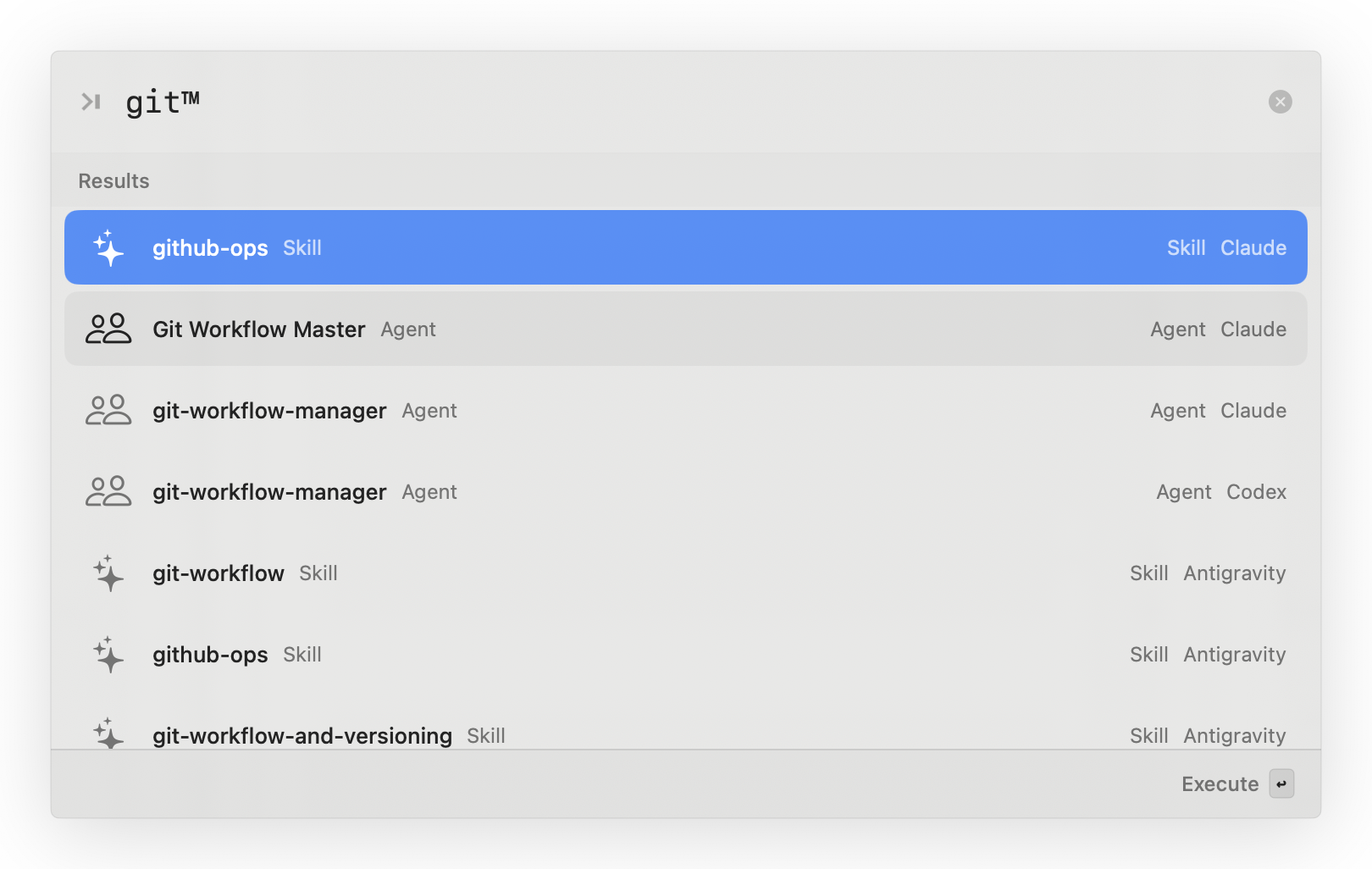
Search any agent, skill, slash command, or workflow — formatted correctly and ready to paste. No more hunting through config folders or guessing syntax.
Version 1.0.3 for macOS • No credit card
required
Verify Hash (SHA256)
Built and operated by ajfbyte
ajfbyte is an early-stage independent software startup project building focused tools for AI-assisted software development. Rouser is its first macOS product: a local launcher for developers juggling agents, skills, slash commands, project rules, and workflows across tools like Claude Code, Cursor, and Codex.
No cloud workspace. No new AI subscription. No hunting for config files.
Your AI coding setup is getting powerful — and messy.
You have agents in one folder. Skills in another. Slash commands you forgot you installed. Workflows copied from GitHub. Project-local rules. Global rules. Provider-specific conventions.
Every new agent, skill, and workflow makes your setup more powerful — and harder to navigate. Five minutes here, ten minutes there, and suddenly your AI stack is slowing down the work it was supposed to speed up.
"What can I run right now?"
-
Searching through
.claude,.cursor, and project folders - Opening old docs to remember command names
-
Guessing whether something runs as
/nameor@name - Copying workflow snippets manually
- Reinstalling tools you already had somewhere
Rouser gives your AI tools a front door.
One place to find, install, and invoke your AI dev capabilities.
Rouser sits quietly in the background on macOS. Hit your hotkey, search what you need, and trigger the right agent, skill, command, or workflow.
It is not another AI assistant. It is the layer that helps you use the AI tools you already have.
Everything useful, one command away.
Stop searching through folders
Find agents, skills, commands, and workflows from one launcher instead of remembering where each tool lives.
Use it when you know what you want to do, but not the exact slash command or file path.
Never guess the format again
Rouser understands the difference
between capabilities. Skills, commands,
workflows get /name. Agents
get @name.
No more guessing whether something should be called with a slash, mention, or copied manually.
Grow your setup without the mess
Found a useful agent or workflow on GitHub? Add it from a URL and make it searchable. Your setup grows without turning into a junk drawer.
Built for local macOS workflows
A lightweight macOS background utility. Launches fast, stays out of your Dock, and appears only when you need it. Designed for keyboard-first developers.
Manage your entire AI stack from one window.
Install from any URL. Move items between projects. Share across your workspace. Bulk copy your best setup to new projects — all without opening a terminal.
Feature 01
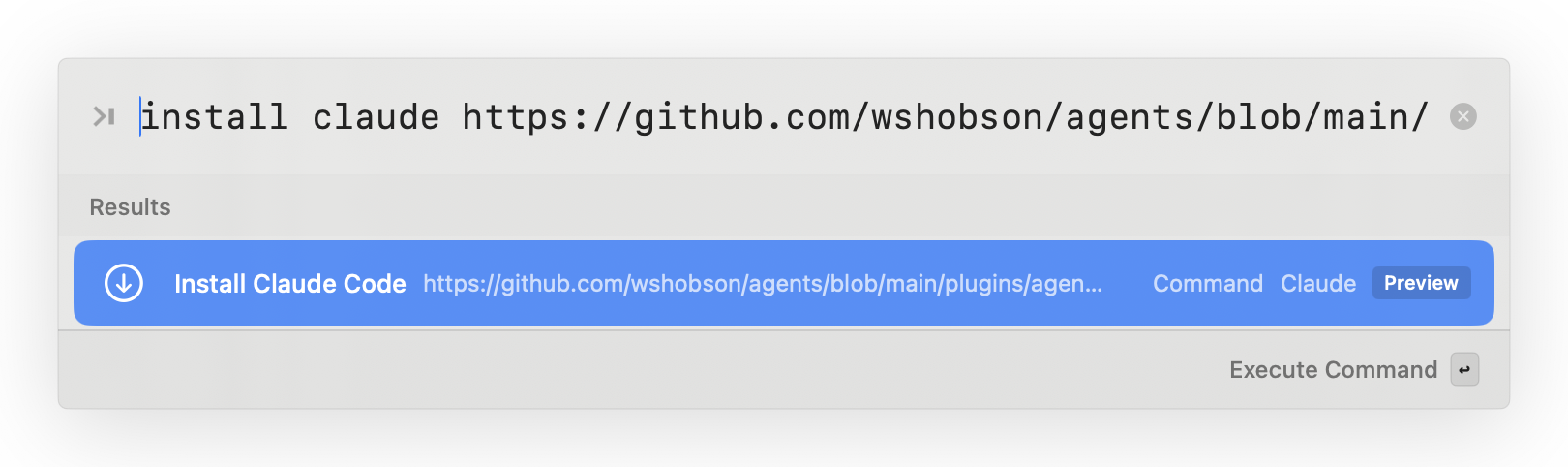
Install any agent, skill, or command from a URL.
Found something useful on GitHub? Type
install claude followed by the URL,
and Rouser installs it to the right provider
folder — Claude Code, Antigravity, Codex, or
Cursor. No manual downloads. No guessing which
folder it belongs in.
Use it when: You find a skill, agent, or command on GitHub and want it working locally in seconds — for any provider.
Feature 02
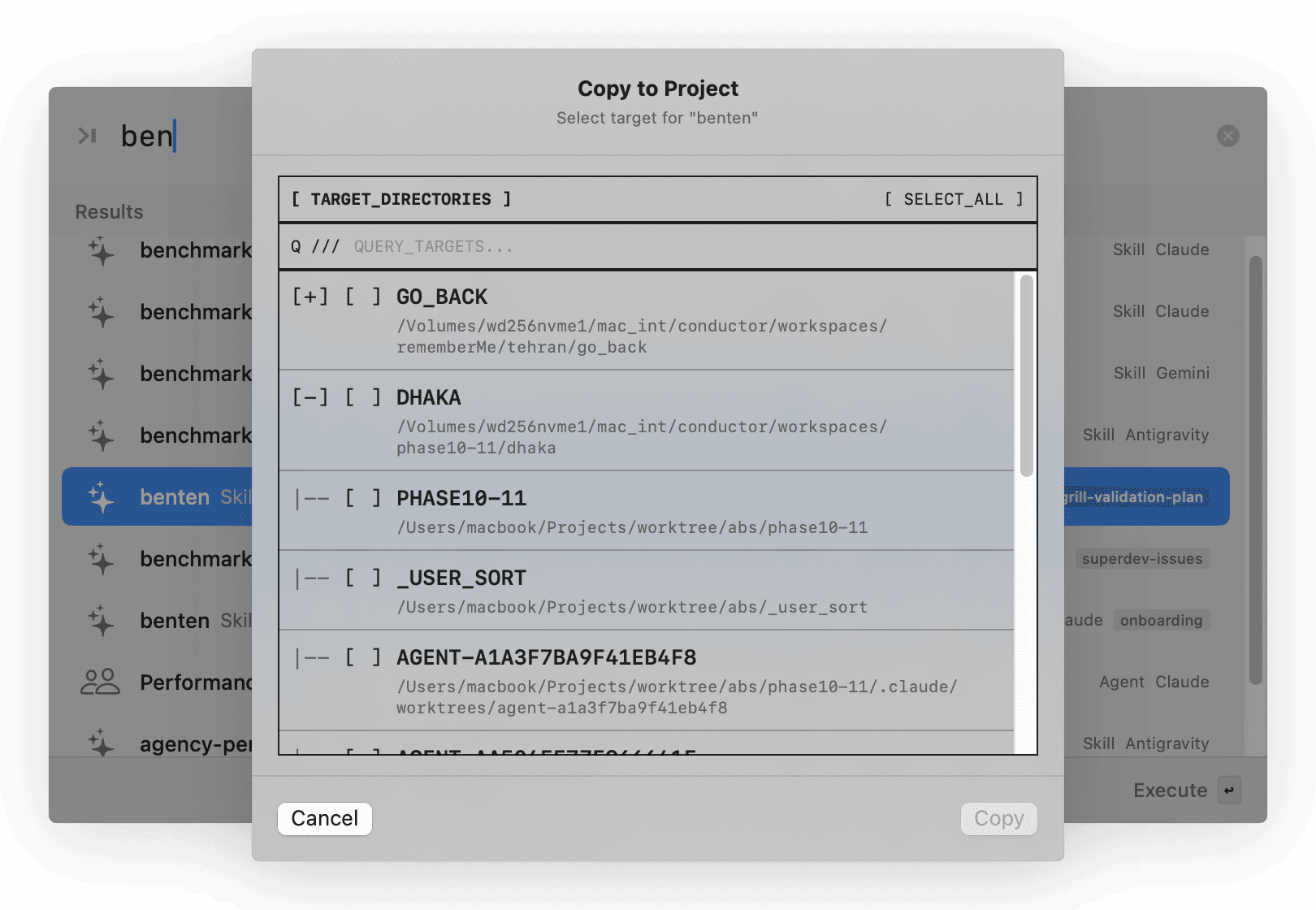
Copy any item to other projects — without leaving Rouser.
Select an agent, skill, command, or rule, hit “Copy,” and pick one or more target projects. Rouser copies the files to the correct provider path in each project. No more switching terminals, remembering folder structures, or drag-and-drop across Finder windows.
Use it when: You built a great skill in one project and want it available in three others. Pick the targets, hit Copy, done.
Feature 03
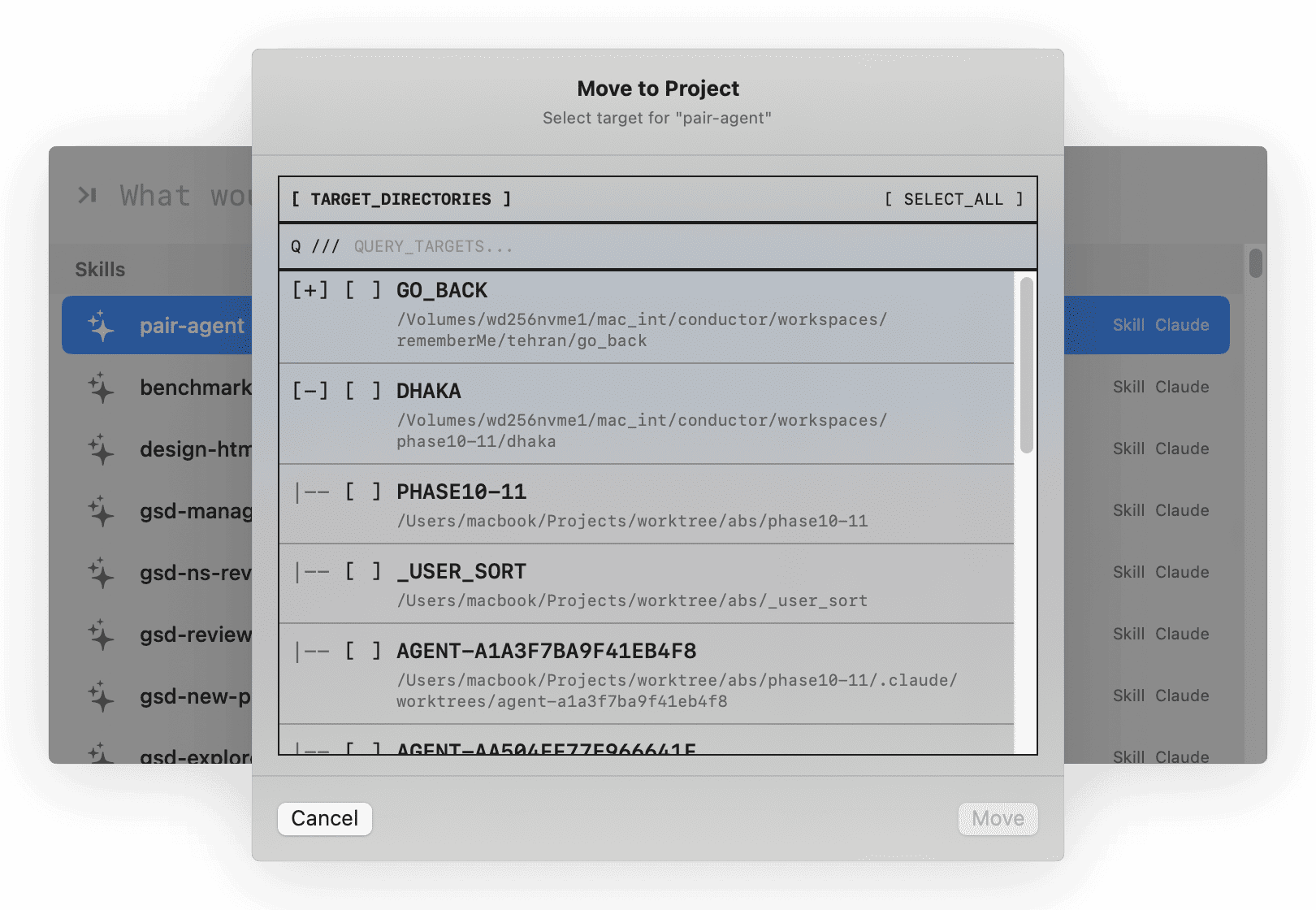
Move or share items across your entire workspace.
Need to reorganize? Move an item from one project to another, or share it across multiple projects at once. Rouser shows all your registered projects and lets you pick targets — whether the item is a skill, agent, command, or workflow.
Use it when: Your AI coding setup evolves. A skill that started in one project now belongs everywhere. Move it, share it, keep your workspace clean.
Feature 04
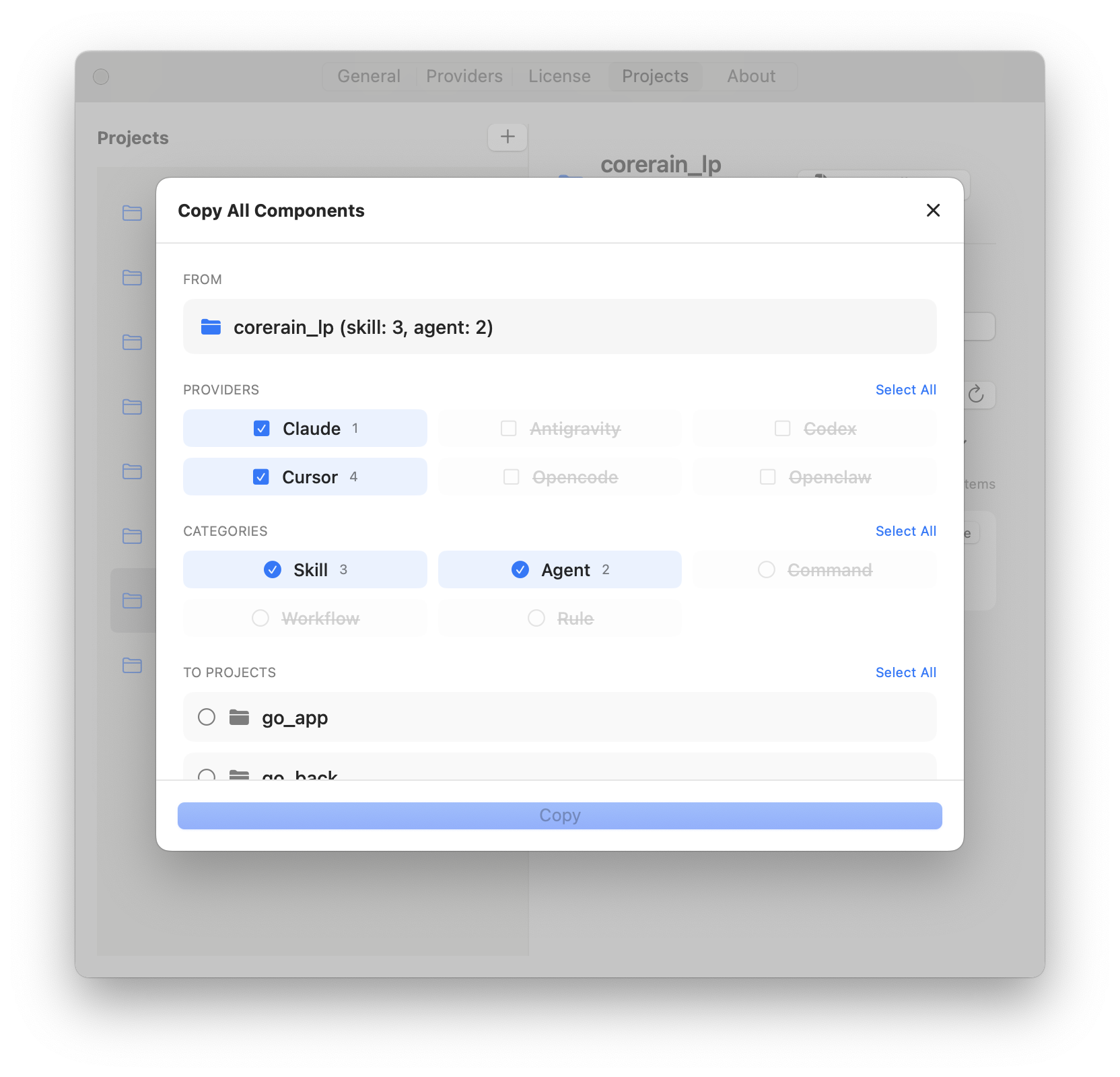
Replicate your best setup to any project in one click.
Already have a project with the perfect set of skills, agents, commands, and rules? Open “Copy All Components,” select which providers and categories to include, pick your target projects, and hit Copy. Your entire preset — replicated instantly.
Use it when: You onboard a new project and want it running with the same AI tooling as your best existing setup — without rebuilding from scratch.
From installed to invoked in seconds.
1
Open Rouser
Hit your global hotkey. Rouser appears instantly.
2
Search what you need
Type what you want: review, commit, test, docs, agent, workflow, or any capability name.
3
Invoke or copy
Rouser formats the invocation correctly and puts it where you need it.
4
Install more from URLs
Paste a GitHub URL to bring new capabilities into your local setup.
Move faster without adding more chaos.
Run the right reviewer
Find
@code-reviewer,
@swift-reviewer, or any custom agent without remembering its
file name.
Launch repeatable workflows
Run
/review-pr, /ship,
/qa, or
your own project commands from one place.
Build your personal AI toolbox
Collect the best skills and workflows you find online, then search them like native commands.
Switch between projects
Project-local capabilities stay discoverable when you need them. No context lost.
Stop rebuilding the same setup
Install from URL, reuse what works, and keep your AI coding stack organized.
Onboard new projects instantly
Start a fresh project with your full AI tooling preset. Bulk Copy brings skills, agents, commands, and rules from your best existing project in one action.
Install community tools for any provider
Found an Antigravity skill on GitHub? An agent
for Cursor? A Claude Code command? Type
install [provider] [url]
in the launcher. One command, correct folder,
done.
Not a launcher. Not a chatbot. A command layer.
Generic launchers open apps. Chatbots answer prompts. Rouser activates your actual development capabilities.
| Capability | Generic launcher | AI chat app | Rouser |
|---|---|---|---|
| Primary function | Opens apps and files | Talks to a model | Finds and invokes your AI dev tools |
| Agent awareness | Does not understand agents or skills | Does not manage local commands | Understands agents, skills, commands, workflows |
| Depth | Broad but shallow | Powerful but isolated | Built for your coding workflow |
| User effort | You still remember the command | You still wire the workflow | Search, install, invoke |
| Invocation format | App name or keyword | Natural language prompt |
/name and
@name — correct format,
auto-selected
|
September Launch Deal
Get Rouser for $7.
That is 90% off during the launch month. One-time purchase. No subscription. No recurring charges.
New name, new launch window. Get Rouser for $7 during September 2026 before it returns to $30.
September Launch Deal
One-time purchase. No subscription.
- macOS command layer
- Search agents, skills, commands, workflows
- URL and GitHub install support
-
/nameand@nameinvocation formatting - Local-first workflow
- Direct download access
- Universal URL install (Claude, Antigravity, Codex, Cursor)
- Copy and move items between projects
- Bulk copy components across providers
- Multi-project workspace management
Launch discount ends September 30, 2026.
Verify Checksum (SHA-256)Requirements
- macOS 15.5 or later
- Apple Silicon or Intel Mac
- Accessibility permission for auto-paste support
- Clipboard-first: if auto-paste is unavailable, your command stays copied
Frequently asked questions
What is Rouser?
Rouser is a macOS command layer for AI development workflows. It helps you search, install, and invoke agents, skills, commands, and workflows from one hotkey.
Is Rouser an AI assistant?
No. Rouser is not another chatbot. It helps you use the AI coding tools and local capabilities you already have.
Which tools does Rouser work with?
Rouser is designed for AI coding setups that use agents, skills, slash commands, workflows, and local configuration patterns — especially workflows around tools like Claude Code, Cursor, Codex, and similar developer environments.
What does "install from URL" mean?
If you find a useful agent, skill, command, or workflow hosted on GitHub or another supported URL, Rouser can help add it into your local setup so it becomes searchable and invokable.
Is Rouser a Raycast or Alfred replacement?
No. Raycast and Alfred are broad macOS launchers. Rouser is focused on AI development capabilities: agents, skills, slash commands, workflows, and local coding-tool conventions.
Does Rouser require Accessibility permission?
Only for auto-paste. Rouser copies the command first, then attempts to paste if enabled. If permission is denied or unavailable, your command remains copied.
Is this a subscription?
No. The September launch deal gives you Rouser for a one-time $7 launch price. No subscription, no recurring charges.
Why is it only $7 in September?
Rouser is launching under its new name. The September promo is a limited launch discount for early users before the price returns to $30.
When does the promo end?
The $7 launch deal ends on September 30, 2026. After that, the price returns to $30.
Will my existing Rouser setup still work?
Rouser is the new name for Rouser, and the transition is designed to preserve existing local workflows and configuration compatibility where possible.
What if I only use one AI coding tool?
Rouser is most useful once you have multiple agents, skills, commands, or workflows. If your setup is still small, it helps you build a searchable toolbox from the beginning.
How does URL install work for different providers?
Type install followed by the provider
name and a GitHub URL in the Rouser launcher. For
example:
install claude https://github.com/...
installs to your Claude Code setup, while
install antigravity
                                https://github.com/...
installs to your Antigravity setup. Rouser routes
the file to the correct folder for each provider.
Can I copy skills and agents between projects?
Yes. Select any item in Rouser, hit Copy, and choose one or more target projects. Rouser copies the files to the correct provider path in each project. You can also move items or share them across multiple projects at once.
What is Bulk Copy Components?
Bulk Copy lets you replicate an entire project's AI setup — or a filtered subset of it — to other projects. You select which providers and categories to include, pick your target projects, and Rouser copies everything in one action. No manual file management.
Which providers does Rouser support?
Rouser supports Claude Code, Antigravity, Codex, Cursor, Opencode, and Openclaw. Each provider's items are stored in their respective configuration folders, and Rouser manages the paths automatically.